AI
MCP server
Let AI agents such as Claude use your data over MCP: publish collections, aggregations, streams and GraphQL apps, and the agent works within your permissions.
Every service can present itself to an AI agent over the Model Context Protocol. You choose which collections, aggregations, change streams and GraphQL applications the agent may use, and describe each one so it knows what the thing is for. Nothing is exposed until you publish it.
Your first agent, in ten minutes
Three steps, from a service to Claude answering a question about your data. Nothing here needs code.
-
Publish a collection. Under Published resources, Add collection, pick one, and write what it holds: a sentence an agent reads to decide whether this is the data it wants. Say
orders: "Customer orders, one document per order, with status and total." Or skip this: the next step publishes a test collection. -
Demo setup. Under Tools → Demo setup, click Do all. It creates the user
agent, a permission for it on/mcpand on the demo collection/catalog, fills/catalogwith the sample products of the ecommerce starter when it is empty, publishes it with a JSON schema and the aggregationlow-stock, and issues an API key, shown once. To letagentreadorderstoo, add a permission for the roleagenton/orderson the Permissions page. Catalogue check now has an identityagentwith the key: click Read the catalogues, and the collections are there. -
Connect Claude. In Claude, Settings → Connectors → Add custom connector, paste the endpoint from Connect an agent, and when Claude asks you to sign in, sign in as
agentwith the password shown in Demo setup. In Cursor, VS Code or Claude Code, use the snippet under Connect an agent instead: the key is already in it. Then ask: "How many orders are still open?"
The agent reads the catalogue, finds orders, reads it with the permissions of agent, and answers. Everything it can do from here is what that user, with that role, can do over REST.
Connect an agent
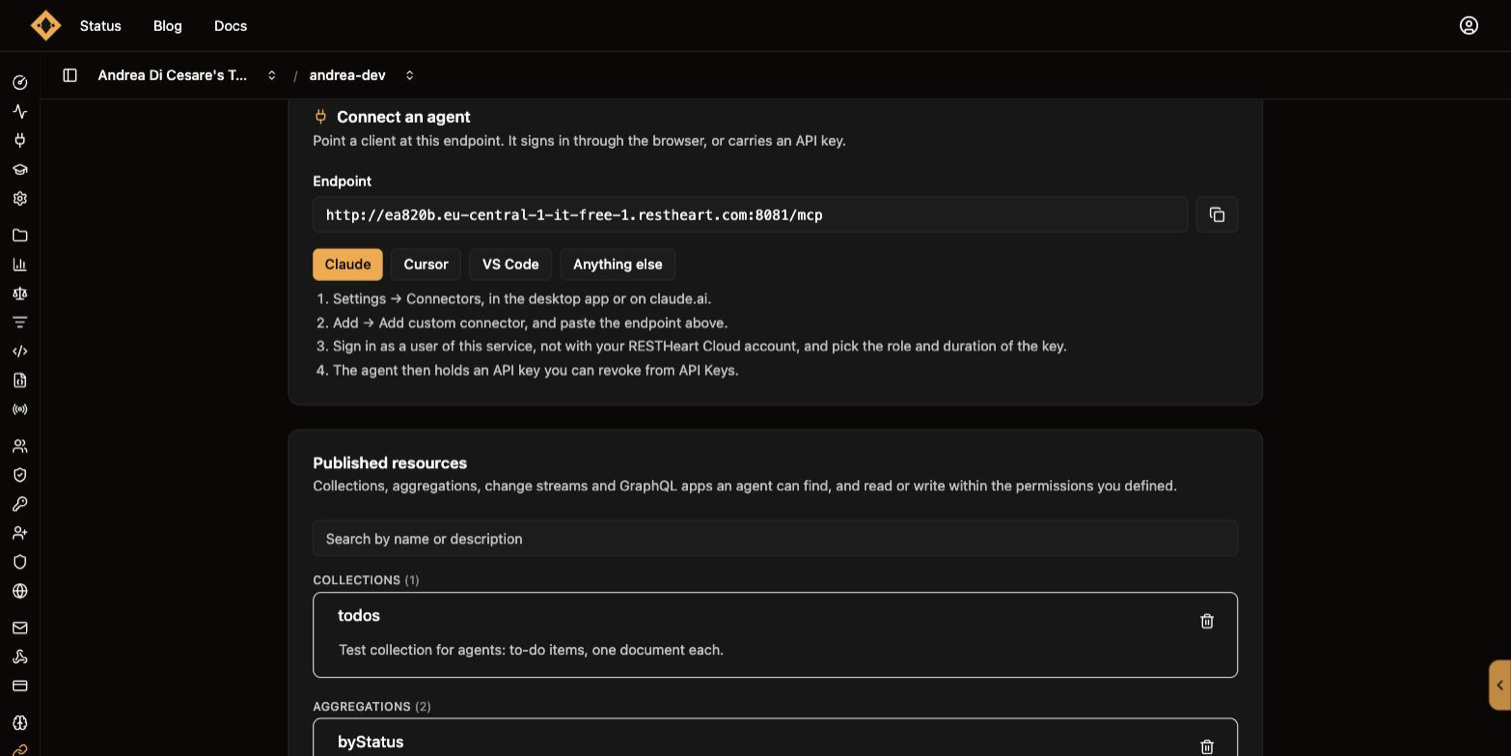
The first panel of the page, open from the start, gives you the endpoint and the four facts every client needs:
| Value | |
|---|---|
Endpoint |
|
Transport |
Streamable HTTP |
Configuration |
MCP 2025-06-18 |
Headers |
|
The panel also has ready-made steps for the three common clients:
-
Claude: Settings → Connectors, in the desktop app or on claude.ai. Add → Add custom connector, and paste the endpoint. Claude then opens your service’s login page: sign in as a user of the service, with that user’s own username and password; the Ulabase account signs you into the console and is unknown to the service. After the credentials the page asks which role the agent gets and for how long, within what you allowed that user on the API Keys page: Claude then holds an API key scoped to that role, the same kind a user issues by hand, and you or the user revoke it from API Keys.
-
Cursor: add it from Cursor’s own settings and paste the endpoint. In the
Authorizationheader putBearerand an API key (ulak_…) a user of the service issued for the agent. The panel shows the.cursor/mcp.jsonit expects, with the key from Demo setup already in it. -
VS Code: run "MCP: Add Server" from the Command Palette and paste the endpoint, with the same
Authorizationheader. The panel shows the.vscode/mcp.json.
For anything else, Zed, Windsurf, Claude Code or an agent you wrote yourself, the four facts above are all the configuration there is.
Give the agent its own credential
An agent reads with the permissions of whoever it authenticates as. Before one can connect, two things have to be in place:
-
An API key. A user of your service issues one for the agent, and the key carries a role you chose for that user on the API Keys page: see API Keys for Agents for how to turn that on and how a key is issued. Give the agent a user of its own: an agent that authenticates as the administrator reads everything the administrator can.
-
Permissions for that role, written on the Permissions page like any other. One to reach the endpoint, with predicate
path-prefix('/mcp'), and one for each collection or resource the agent may read, exactly as for a RESTGETon it: the samereadFilterandprojectResponseapply. A resource no permission of the role could ever allow is not in its catalogue, published or not.
A client that signs the user in through the browser, like Claude, uses a key too: it obtains one by signing in. The sign-in page becomes a consent step, role, duration and name within the apiKeys block of the user’s permission, and what Claude gets from /token is a ulak_ key with that role. So the two points above hold for Claude as for Cursor: the user needs a permission on /keys naming the roles a key may carry, and the chosen role needs its permissions. Without such a permission the sign-in falls back to the user’s own token, with every role the user holds; see The OAuth login page for how to forbid that.
Published resources
Under the connect panel, Published resources: the collections, aggregations, change streams and GraphQL apps an agent can find, and read or write within the permissions you defined. It starts empty.
To publish something, click the Add button for its type at the bottom of the panel (Add collection, Add aggregation, Add change stream, Add GraphQL app), and a form opens in its place:
-
Which one: pick from what is not published yet, of that type.
-
What it is for: the description the agent reads to decide whether this is the resource it wants.
-
Publish.
The description is the part that matters. An agent picks a resource by reading it, so write what the thing holds or computes; its name is already there:
| Type | What to write |
|---|---|
Collection |
What it holds, so an agent knows when to read it. |
Aggregation |
What it computes, and what its parameters mean. |
Change stream |
What changes it reports. |
GraphQL app |
What this API is for. |
The panel groups what is published by type, says how many there are of each, and gives you a search box over names and descriptions. A description is edited in place: click it, change it, and Save appears on that row. Beyond twenty-five resources the list is paged, and the counts beside each type stay the total, whatever landed on the page.
To unpublish, remove the entry. The agent stops seeing it on its next catalogue read.
The page reads every collection of the service to find what is published, since that is where the mcp block lives. Past a thousand collections it stops and says so, and what lies beyond is not listed.
Publishing and permissions are two separate switches. A readable resource that is not published is not in the catalogue, and a published resource no permission of the role could allow is not either.
Who the catalogue is composed for
A catalogue is built per caller. To decide what to announce, RESTHeart reads the permissions of the role the agent authenticated as and announces a resource as soon as one of them could allow a read of it.
"Could allow" is the exact wording. A permission that decides on something the call carries, a query parameter or the request body, cannot be decided while a listing is being composed, because there is no call yet: that part is left open and the resource is announced. The call itself is authorized as usual and may answer 403. A condition on who is asking is different: it is known, so it decides. A permission such as path-prefix('/orders') and equals(@subscription.plan, 'gold') announces /orders to a customer on the gold plan and to nobody else, something no list of roles could express, since every customer holds the same role.
The same rule decides a resource’s actions. A resource is described with the actions the caller’s own permissions could allow: a role holding only GET on a collection is not offered its writes. An action the permissions might allow is offered, with what the catalogue knows about it: a write whose rule reads a query parameter says that whether it goes through depends on what the call carries, because a listing does not have it.
A collection also publishes the operations on itself: reading and changing its properties, dropping it, its indexes, and the bulk writes. Each says what it acts on (delete removes one document, drop removes the collection with everything in it), and each needs two things: a permission matching the request, and a switch in that permission’s mongo block (allowManagementRequests, allowBulkPatch, allowBulkDelete). Those switches are off unless written, so by default nobody is offered them.
Your permissions are the only thing enforced, and for almost every policy they are also all the catalogue needs: Ulabase reads them and works the listing out by itself. One case needs telling, and what is at stake there is the accuracy of the listing, since the permission itself is enforced anyway: a permission whose condition is a predicate or a variable added by custom code that declares nothing about itself, such as is-premium() or @billing.tier. The catalogue cannot read it, so it does not guess: it announces the resource to everyone the rest of the rule admits. The same holds when access is decided by a custom authorizer, which has no predicate to read at all. The two keys below are how you say what those cases mean.
|
Important
|
The catalogue is discovery. It decides what an agent is told about; granting and blocking belong to the permissions:
So keeping a resource out of a catalogue protects its name and description, often exactly what you want, since a description says what the data is. The data itself is protected by permissions alone. |
Two keys of a resource’s mcp metadata override all of this, and both decide what is announced; what may be read stays with the permissions:
| Key | What it does |
|---|---|
|
A list of roles the resource is not announced to, whatever the permissions say. For a resource the permissions do allow and whose very name should stay quiet. |
|
A predicate replacing the reading of the permissions. It may only read the caller and the resource, never the call; one that reads the call is refused and the resource is not announced. |
hide_from_roles is decided first and wins over show_if too. Both are under Catalogue visibility, below each published resource.
|
Warning
|
hide_from_roles keeps a name out of a listing and leaves the read allowed. If the role must not read the data, write that on the Permissions page: the permission is the one that is enforced.
|
Parameters of a parametric aggregation
An aggregation whose pipeline uses $var takes parameters, and the page lists them under the entry, one row each, driven by the pipeline itself: add a variable to the stages and the row appears.
Give each one a type and a description. Left undescribed, an agent is told the parameter exists and nothing more, which in practice means it guesses.
A value MongoDB stores in its own type takes that type: date, objectId, long or decimal. The agent is told to send {"$date": <epoch millis>} for a date, and the pipeline receives a date. As a string, a parameter compared with a date field matches nothing.
A parametric aggregation reaches the agent as a resource template, a different kind of entry from a plain resource, and many clients, Claude Desktop among them, list only plain resources. That absence is normal: the aggregation is there, the agent finds it with list_apis and runs it with call_api, and the server says as much in the instructions it sends when a client connects.
Tools
At the bottom, three folded panels: click a title to open it.
Demo setup
Creates a test user, its permission, a test collection and an API key, so you can connect an agent right away. Normally you define roles for agents, let your users issue API keys with those roles, write the permissions and publish resources; this panel makes a test version of each, and shows with a checkbox which ones already exist:
| Item | What it is | Button |
|---|---|---|
Test user |
A user of the service with the role |
Create, or Reset password when the user exists |
Test permission |
The role |
Create, or Rewrite |
Demo collection |
The same collection the ecommerce starter sells from. Created if missing; when empty, filled with the starter’s sample products (a hundred, from |
Publish |
API key for |
Turns API keys on if needed, lets the role |
Issue, or Reissue |
Do all runs the unchecked items in order. Everything it writes is what you would create yourself on the Users, Permissions, Schemas and API Keys pages, under those names, and can be changed there. A permission applies within 20 seconds.
To just try, the root user created with the service works too, and sees everything.
Catalogue check
The catalogue is one per identity, so the useful question is what shape the catalogue has across them. Add up to eight identities, an API key for each role, a user on each plan, with a label each, type their key or password, and read the catalogues.
Resources. One row per resource, one column per identity: visible or hidden. Click a cell to record what that identity is meant to see; a cell that disagrees with its expectation is marked, and the count of failing expectations is at the top. Two rows deserve a second look: all visible for a resource that should be reserved, and all hidden for one you published on purpose.
Actions. Click a resource to see its actions for every identity, the ones on its elements apart from the ones on the resource itself: delete removes a document, drop removes the collection. ✓ offered, ~ offered but decided by the call’s arguments (the note says on what), ✗ refused by that identity’s permissions, and a dash when the resource is hidden from that identity. A row of ✗ on drop is the normal case: the data management operations need allowManagementRequests in the permission.
Reading it. The catalogue errs in one direction only: it never hides what a permission could allow, and when it cannot tell, it lists. So:
-
a resource missing for an identity is missing because that identity’s permissions do not allow it, or because of its
show_if: look there; -
a resource listed where it should not be is the usual surprise. Keep it out with Hidden from roles or Shown only if under the resource’s Catalogue visibility (a failing expectation links straight to it), and remember that neither stops a read: only a permission does;
-
an action shown ✗ is almost always a switch the permission does not grant:
allowManagementRequestsfor the operations on the collection itself,allowBulkPatchandallowBulkDeletefor the bulk writes. The matrix names the one each action needs.
The identities and the expectations are saved with the service, the keys and passwords are not: type them again when you come back. Demo setup adds the identity agent with the credential it has just made.
Test with the credential the agent will actually use. A user’s password shows what the user sees; a key carries only the roles it was issued with, so its agent may see less. And three things the matrices do not show on their own:
-
What an agent then reads is narrowed again by the permission’s
readFilterandprojectResponse, which apply to MCP reads as they do to REST ones. -
A resource listed as visible can still answer
403. The catalogue announces what a permission could allow; whether a given call is allowed is decided when it is made: see Who the catalogue is composed for. -
A GraphQL app’s schema is already per caller: a field its
@visibledirective hides from a role is absent for that identity.
The OAuth login page
Clients like Claude use OAuth authentication: when a user adds your service as a connector, Claude opens a login page where they enter their credentials for your service. Clients that use an API key, like Cursor and VS Code, never see it.
If you turned on Login with Google on the Sign-up, OAuth & Invitations page, the default login page offers it here too: a Continue with Google button above the username field. A user who has never signed in to your service gets an account on the spot, with whatever your service gives a new user, and the agent then works with that user’s roles. Nothing else to configure: the same client ID and secret, and the same providers, that your app’s own sign-in uses.
The default page is https://c0ffee.ulabase.app/oauth/login. Under OAuth Login Page you can set a custom one, so the user sees your application’s login: it receives the OAuth parameters as a query string and must POST them, plus the user’s credentials, to https://c0ffee.ulabase.app/authorize. The URL must be absolute, https:// or http://.
The same panel lists the allowed redirect URIs: the redirect_uri values /authorize accepts, * as a wildcard. It starts as the default list, which is what Claude and the desktop clients need. If you customise it, keep the claude.ai entry, or Claude can no longer connect: your list replaces the default, so what you leave out is gone.
What the agent gets
The panel’s first setting says what the sign-in hands the agent:
API key when possible |
The default. After the credentials, the page offers the user the roles their permission on |
API key only |
Same, but a user whose permission allows no key cannot connect an agent at all: the page tells them to ask you. Choose this when no agent should ever hold a user’s full permissions. |
The user’s own sign-in |
What happened before API keys: the agent gets the user’s own token, renewable without end, with nothing to revoke. For a service that wants that, knowingly. |
A key obtained this way is not renewed: it lasts what the user chose, and then Claude asks the user to sign in again. Revoking it from API Keys disconnects the agent within twenty seconds.
A custom login page follows the same contract as the default one, in two steps: after verifying the credentials with GET /authorize/offer (Basic authentication, the same query string as /authorize) it renders the choices the answer lists (204 means nothing to choose, 403 a refusal to show) and POSTs the form to /authorize with each choice as a choice.<name> query parameter (choice.role, choice.days, choice.name). A page that sends none gets the defaults: the first role the user may give, the default duration, a name with the client and the date.
Related pages
-
The market game: the full tutorial: three AI agents trading through a service’s MCP server, with one collection, six rules and no code
-
API Keys for Agents: the credential an agent uses, and how a user issues one
-
Managing Permissions (ACL): what an agent may read, including
readFilterandprojectResponse -
JSON Schemas: what the demo collection’s schema is made of
-
Aggregation Pipelines: where
$varparameters come from -
GraphQL Applications: the
@visibledirective