Your users
API keys
Long-lived, revocable credentials a user issues for an AI agent, a script or an app, with roles you allow. Turn it on and decide who may issue what.
|
Note
|
API keys for a service’s users are available from Ulabase’s 9.9 release. |
Something acting on a user’s behalf — an AI agent, a script, a mobile app, another backend — connects to your service and stays connected. There is no sign-in dialog in which to renew a token, and a fifteen-minute JWT is no use to it. What it needs is a credential that lives long and can be revoked one at a time: an API key. AI agents over MCP are the case that made this urgent; the key is the same for any of them.
The key belongs to a user of your service — one of the people who sign in to your application — and is issued by that user, with roles you allow for that user’s role. Your application asks the service for it on the user’s behalf. You, the owner, decide whether this is possible at all, which roles a key may carry for whom, and you see and revoke everything that was issued.
Not to be confused with the personal access tokens of your cloud account, which ulabase signs in with. Those reach your services' configuration; these reach one service’s data, as one of its users, and nothing else.
How it works
-
You install the API Keys feature on the service, as you would any other, and set its default limits.
-
You write a permission on
/keysfor each role that may issue, naming in it the roles a key may be given. The API Keys page does this for you. -
A user issues a key with
POST /keys, signed in with their own credentials, naming the roles they want among those their permission allows. -
The client sends the key as
Authorization: Bearer ulak_…, and does what those roles may do. -
Anyone revokes: the user their own, you any.
Two things have to agree before a key can be issued, the feature being enabled and a permission with an apiKeys block. Each on its own does nothing, and the error says which one is missing.
Who may issue which keys
This is the part to get right, and it is written where every other grant is: in the service’s ACL. A permission that lets a role reach /keys carries an apiKeys block naming the roles a key may be given, and optionally its own limits:
{ "_id": "adminsIssueKeys",
  "predicate": "path-prefix('/keys')",
  "roles": ["admin"],
  "priority": 10,
  "apiKeys": { "roles": ["cli-rw", "api-admin"], "max-expires-in-days": 365 } }

{ "_id": "usersIssueKeys",
  "predicate": "path-prefix('/keys')",
  "roles": ["user"],
  "priority": 1,
  "apiKeys": { "roles": ["cli-ro"] } }
With these, an admin may issue a cli-rw or an api-admin key and a user only a cli-ro one. The key roles need not be roles the user holds — usually they are not: a key’s role is deliberately narrower than its owner’s, and it can do only what other permissions grant to it. cli-ro, cli-rw and api-admin here are ordinary roles you define like any other.
These rules follow from how RESTHeart evaluates permissions:
-
One permission decides. When several match — a user who is both
adminanduser— the one with the highest priority is the one that applies, and only itsapiKeys.rolesare available. Give the wider grant the higher priority. -
A permission without the block grants nothing. Its roles reach
/keysand get a403that says so. Reaching the endpoint and being allowed to issue are two different things. -
A malformed block is refused where it is written.
rolesmust be a non-empty array of distinct role names, the two limits whole numbers within their bounds, and no other field is accepted. A typo —roleforroles— would otherwise be a permission that reaches/keysand grants nothing, found out only by a refused user; so the service answers the write with a400that names the field, whoever writes it: the console,ulabase,curl. -
An administrator never gets a key. A user with the role
rootorsrv-adminadministers the service and is not one of its users, whatever the ACL says:POST /keysanswers403, and the sign-in of an agent gives them their own token, with all their permissions, or refuses when the service hands out only keys. To connect an agent with a key, sign in as a user of the service.
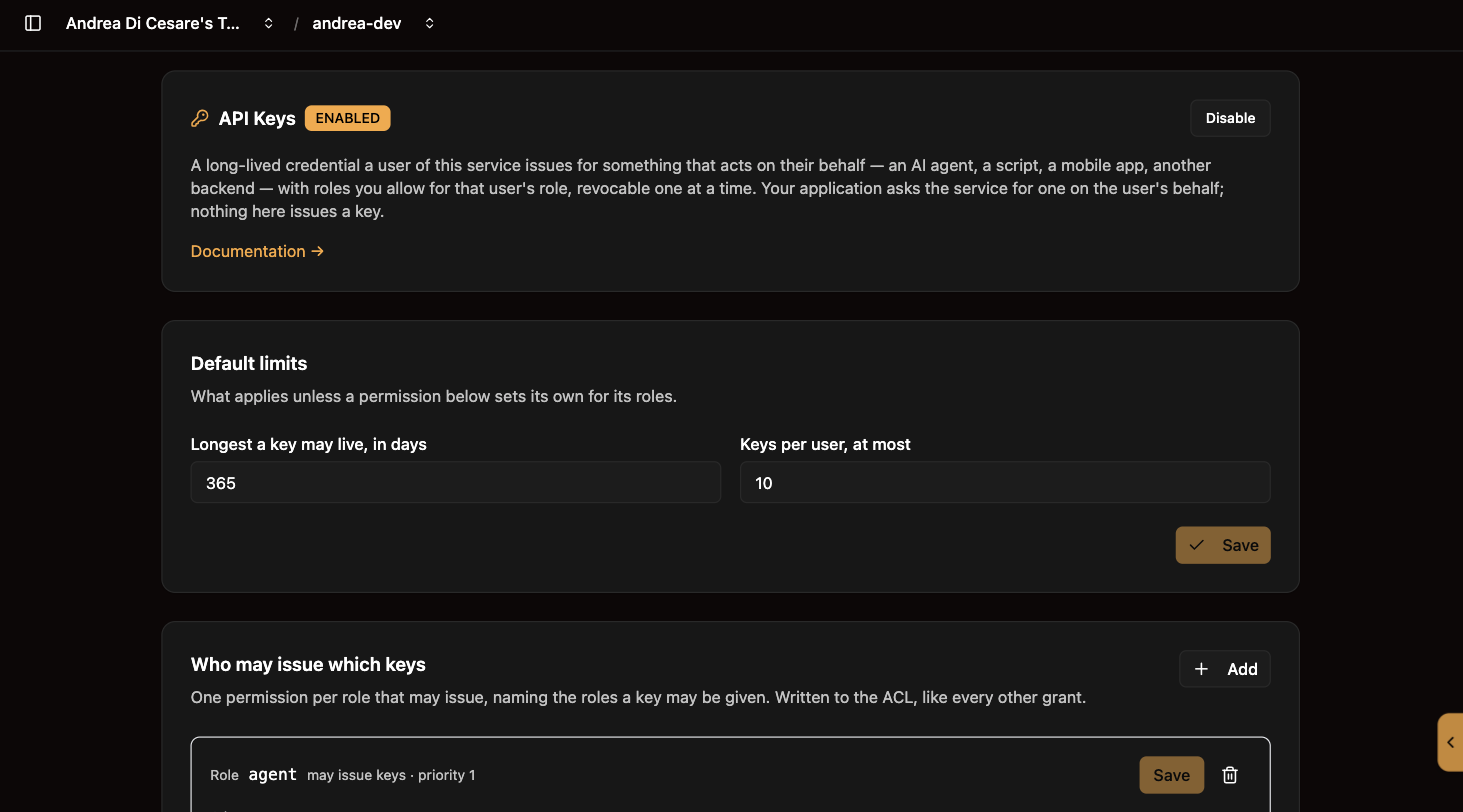
The API Keys page lists the permissions on /keys with the key roles each one grants, lets you edit them, and adds a new one from three fields: the role that may issue, the roles a key may carry, and, optionally, its limits. They are ordinary permissions, also visible on the Permissions page, and like any ACL change they apply within twenty seconds.
Turn it on
API keys are a feature, with the lifecycle every feature has: Install, Enable, Disable, Uninstall, and a badge that says where it stands. The API Keys page opens with it. Disabled or uninstalled, POST /keys answers 403 whatever the ACL says, and no key authenticates; nothing is deleted, and installing again finds the keys, the permissions and the limits as they were. It is free on every tier.
Below the feature, the default limits:
| Setting | What it decides |
|---|---|
Longest a key may live |
The default, in days, up to ten years. A permission may set a lower one for its roles. A user may ask for less, never for more. |
Keys per user, at most |
The default. A permission may set its own. A user at the limit has to revoke one before issuing another. |
Issue a key
Your application calls the service, with the user’s own credentials:
curl -u alice@example.com:her-password \
  -X POST https://c0ffee.ulabase.app/keys \
  -H 'Content-Type: application/json' \
  -d '{ "name": "my agent", "roles": ["cli-rw"], "expiresIn": 90 }'
{
"_id": "68c7…",
"name": "my agent",
"roles": ["cli-rw"],
"expiresAt": { "$date": 1765555200000 },
"key": "ulak_Kx7Rz9…"
}The key is shown once. Only its SHA-256 is stored, so it cannot be recovered afterwards, not by you, not by the user, not through any endpoint. An application that loses one issues another.
roles is the part to understand. A key’s roles must lie within what the permission that authorised the call names in its apiKeys.roles — nothing else, whatever the user holds. With the permissions above, alice as an admin may write ["cli-rw"] or ["api-admin"] and nothing else; bob as a user only ["cli-ro"]. Left out, roles is empty, and an empty key can do nothing.
There is no field in which to name another user. The principal is the one who signed in, always; anything else in the body is not read.
expiresIn is in days, defaulting to 90 or the maximum that applies, whichever is lower: the permission’s, when it sets one, otherwise the service’s.
Use a key
curl https://c0ffee.ulabase.app/things \
  -H 'Authorization: Bearer ulak_Kx7Rz9…'
The request runs as the user who issued the key, with the key’s roles and no others. The ACL applies as it does to a password sign-in — readFilter, projectResponse, everything. An MCP client uses the same header on /mcp.
A key works on the service it was issued on and nowhere else, not even on another of your services that happens to know the same role names.
List and revoke
A user sees their own keys, without the key or its hash:
curl -u alice@example.com:her-password https://c0ffee.ulabase.app/keys
curl -u alice@example.com:her-password -X DELETE https://c0ffee.ulabase.app/keys/68c7…
lastUsedAt is absent until the key is first used. That absence is the useful part: it is how you tell the key somebody forgot about from the one in use.
via says how the key was issued — api with POST /keys, oauth by an agent signing the user in — and client names what asked for it, claude.ai say. A key from the sign-in is the same credential in every other respect, and this is how you tell them apart.
You see every key issued on the service on the API Keys page, with who holds it, which client asked for it, and when it was last used, and revoke any with the bin icon. Revocation takes effect within twenty seconds.
A key from a sign-in
An agent that signs the user in through the browser — Claude, when your service is added as a connector — does not call POST /keys: it obtains a key by signing in. After the credentials, the login page asks the user which role the key gets and for how long, within the very same apiKeys block that decides what POST /keys would accept for them, and /token hands the agent a ulak_ key. Nothing to set up beyond what is above: turn keys on, grant /keys to the issuing roles with the block. The user sees the key in GET /keys and you on the API Keys page, with via: "oauth" and the client; revoking it disconnects the agent.
The key is not renewed: it lasts what the user chose, then the agent asks them to sign in again. Every sign-in issues a new key, and the old ones stay until they expire or are revoked; a user at the limit is told on the login page to revoke one first.
What the sign-in hands out is set on the MCP page, under OAuth Login Page: a key when the user may have one, the user’s own token otherwise (the default); a key or nothing; or always the user’s own token. See MCP, What the agent gets.
Try the MCP catalogue with a key
The What an agent sees panel on the MCP page accepts an API key. Use it. The catalogue an agent gets is filtered by what its credential may read, so a test made with a user’s password tells you what the user sees, not necessarily what their key does: the key carries only the roles it was issued with.
Related pages
-
MCP — where an agent uses the key
-
Tokens — the other kind of credential, for your cloud account and
ulabase -
Managing Permissions (ACL) — where the
apiKeysblock lives, and what a key’s roles may do