Your data
Collections and documents
Your app's data is stored in collections of JSON documents: browse, create, edit and delete them from the console, or with the same calls from your app.
Your app’s data is stored in collections. A collection is a group of JSON documents of the same kind, such as orders or products. The console shows them under Collections: the list of collections first, then the documents of the one you open.
Use this page to look at your data, fix a document by hand, or learn the calls your app needs. For example, you can filter the open orders, sort them by date and read them a page at a time.
What you get:
-
One call per action. Everything you do in the console is one API call, shown next to each action, so your app can do the same.
-
Filters, sorting, pages and partial updates. The same options work from the console and from your app.
Collections
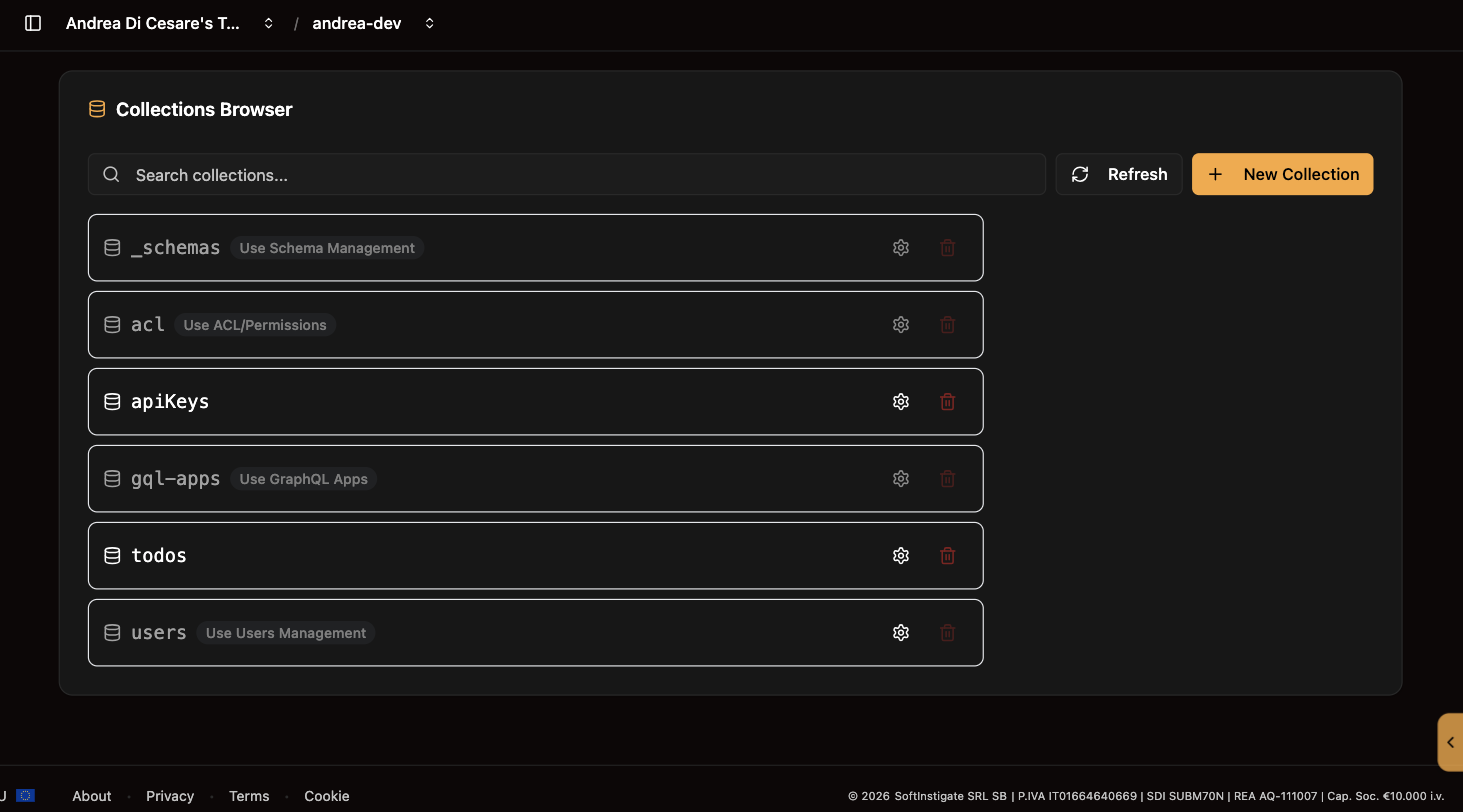
The list shows every collection of the service. On Enterprise, a database selector at the top picks the database. The system collections (users, acl, schemas, gql-apps) are listed but managed from their own pages.
Create one with New collection: type a name and click Create. A collection whose name ends in .files is a file bucket, and the console treats its rows as files with a download link.
Some names are taken. A collection answers at /<name> of the service, where the services of the platform answer too, so a few names are refused with 400:
-
the paths of the platform:
auth,graphql,health,ic,keys,mcp,metrics,oauth,ping,register,roles,stats,stripe,token,.well-knownand a few more; -
any name that starts with
_, which RESTHeart uses for its own resources; -
the collections the platform keeps in every service:
users,acl,schemas,gql-apps,apiKeys,teamsand the others it creates when a feature needs them. These cannot be deleted either.
A name that only begins like one of them, such as statsx or authors, is free. The service lists the reserved names at GET /_reserved-names, and the console checks them before it creates the collection.
The gear binds a JSON Schema to the collection: every document written to it must match. The collection’s metadata also holds the aggrs and streams arrays, which the Aggregations and Change streams pages manage.
The bin deletes the collection and every document in it, after a confirmation.
| Operation | API |
|---|---|
List collections |
|
Create collection |
|
Read metadata |
|
Bind a schema |
|
Delete collection |
|
Names you cannot use |
|
Documents
Open a collection to see its documents.
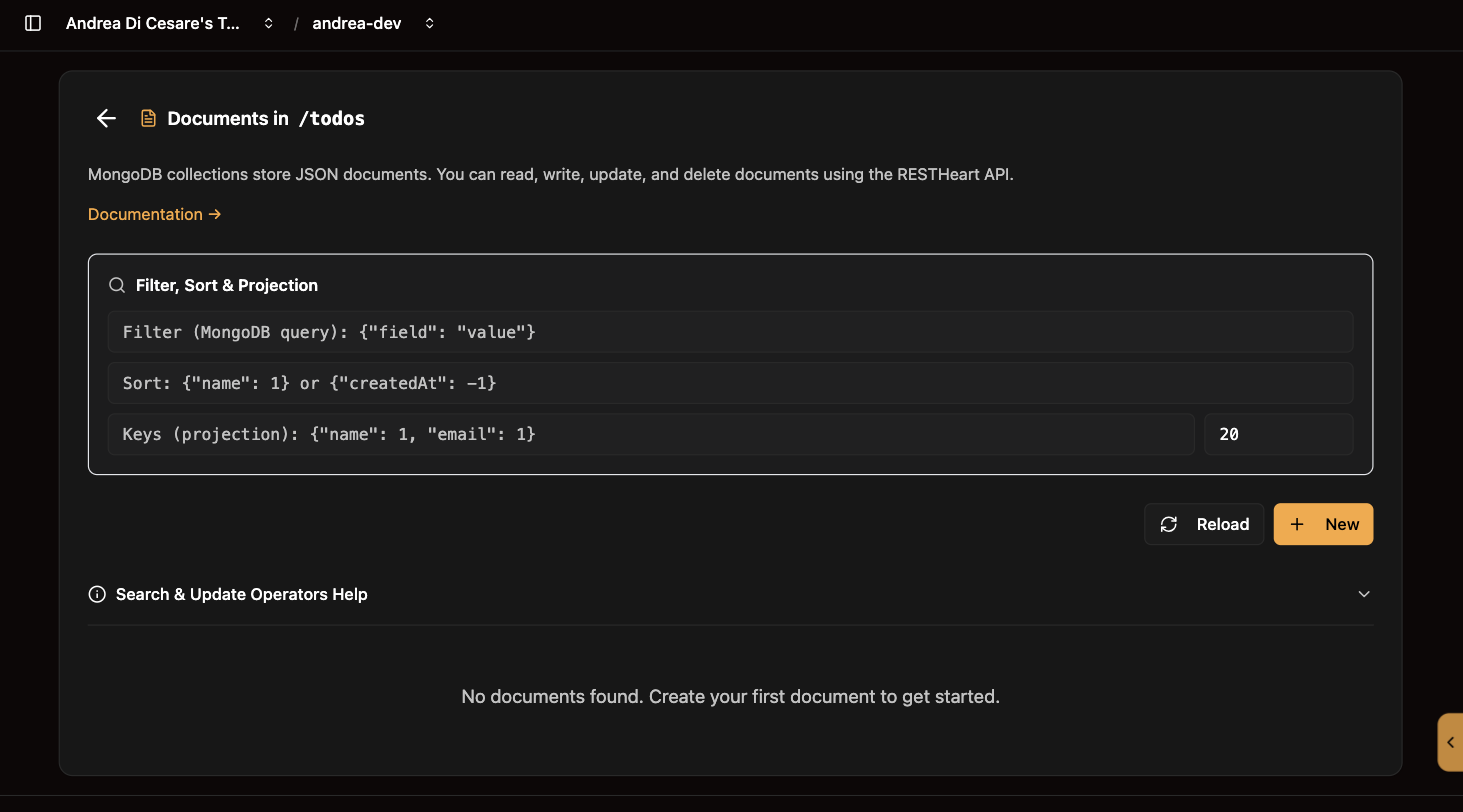
Find what you want with the three fields at the top. They are the filter, sort and keys parameters of the API, and the list refreshes as you type:
| Field | What to type |
|---|---|
Filter |
A MongoDB query, such as |
Sort |
|
Keys |
A projection, |
New opens a JSON editor for a document. Leave _id out and MongoDB assigns one.
Edit on a row opens the document in place. Saving sends a PATCH with the fields you changed: fields you did not touch are kept.
Delete on a row removes the document, after a confirmation.
The console handles every kind of _id: an ObjectId, a string, a number or a date. In a filter, an ObjectId is written {"_id": {"$oid": "…"}} and a date {"$date": "…"}.
| Operation | API |
|---|---|
Read, filter, sort, page |
|
Create |
|
Update some fields |
|
Replace |
|
Delete |
|
Download a file |
|
From your app these are plain HTTPS calls with the user’s credentials. What each user may read and write is decided by permissions, and a readFilter there can limit a user to their own documents without the app knowing.
When a request carries filter or sort, the client is writing its own query. Ulabase refuses it unless the caller’s permission has allowFilter on. The root of the service has it, so your scripts can filter and sort.
The users of your app usually do not have it. For them, declare an aggregation with the criteria they may choose, and have the app call it.
The sizes of the plan
A document, a file and the whole service have a size that follows the plan: 512 KB, 2 MB and 500 MB on Free; 512 KB, 2 MB and 2 GB on Starter; 1 MB, 16 MB and 8 GB on Pro. A document or a file over its size is refused with 413. The space of the service is measured once an hour, data and indexes together: the members of the team get an email at 80%, and at 100% the writes that add bytes (new or changed documents, files, indexes) are refused with 507 until space is freed or the plan grows. Reads, deletes and the properties of collections keep working, so you can always make room.
Related pages
-
Schemas: refuse a document that does not match.
-
Indexes: keep filters and sorts fast as the collection grows.
-
Change streams: let the UI know when a document changes.
-
Plans: the database selector and the paths on Enterprise.