Your documentation contains the answers your users need, and finding the right one is often hard. Users scan through pages, try a search that does not help, and eventually give up and open a support ticket.
With Sophia AI your users ask questions in their own words, and Sophia answers from your documentation, at any hour and with no human intervention.
The Documentation Problem
Applications come with extensive documentation: user guides, technical references, API documentation, policy documents, onboarding materials. This information is spread across PDFs, Markdown files, HTML pages, and text documents.
Static search serves users poorly. It matches keywords and returns irrelevant results. Specific answers are hard to find in long documents. Users and documentation use different terms, so searches miss. Support teams answer the same questions repeatedly.
Sophia AI replaces the search box with a conversation.
How Sophia Works
Sophia turns static documentation into a conversation in three steps.
Step 1: Upload Your Documentation
Sophia accepts the common formats: PDF, Markdown, HTML, and text files. You upload your existing documentation as it is, with no reformatting and no special preparation.
Step 2: Automatic AI Indexing
Sophia processes your documentation with semantic embeddings, which capture meaning where a keyword search matches exact terms. This is RAG (Retrieval-Augmented Generation): semantic search combined with the responses of a large language model.
The system creates vector embeddings that capture the meaning of your content. When users ask a question, Sophia finds the relevant information by semantic similarity. Users can ask in their own words, and Sophia finds the answer even when the exact terminology differs.
Step 3: Conversational Answers
Users ask questions in plain language: "What are the pricing options?" "How does authentication work?" "Can I use GraphQL?" Sophia interprets the question, retrieves the relevant documentation sections, and generates an answer in context.
Every answer includes source references, so users can verify the information and explore related topics. The responses are written in clear, conversational language, composed from the retrieved sections.
Real-World Impact
Sophia fits four scenarios.
Customer Support Automation answers common questions at any hour. Support teams work on the complex issues that require human expertise.
Employee Self-Service covers internal documentation: onboarding, policies, procedures. Employees get answers without contacting HR or IT, and new hires find information on their own.
Documentation Q&A makes technical documentation interactive. Developers ask questions and receive answers in context, with code examples, without searching through long API references.
Educational Support assists students at any hour. They get help on course materials, assignment instructions and institutional information whenever they need it, regardless of time zone or staff availability.
The Technology
These are the components Sophia is built on.
RAG Technology
Retrieval-Augmented Generation combines semantic search with a language model. Sophia first retrieves the relevant documentation sections, then generates an answer grounded in that content. Grounding the answer in your documentation limits hallucination.
Powered by Claude
Sophia uses Anthropic's Claude to understand the context of a question, follow its instructions and write the response. The conversation reads naturally to your users.
Security and Privacy
Your data stays private. JWT authentication ensures that only authorized users access Sophia. Data isolation keeps your conversations and documents separate from those of other tenants. Your information is never used to train AI models and is not shared with third parties. GDPR compliance is built in.
All data is encrypted in transit and at rest. Role-based access control lets you define which users see which content via tags, which suits multi-tenant scenarios and organizations with different access levels.
Multi-Language Support
Sophia currently supports English and Italian, and more languages are planned. Users ask questions in their preferred language and receive answers in the same language.
Multiple Document Formats
Upload PDF manuals, Markdown documentation, HTML help files, and plain text documents. Sophia indexes everything into a single knowledge base.
Sophia in Action
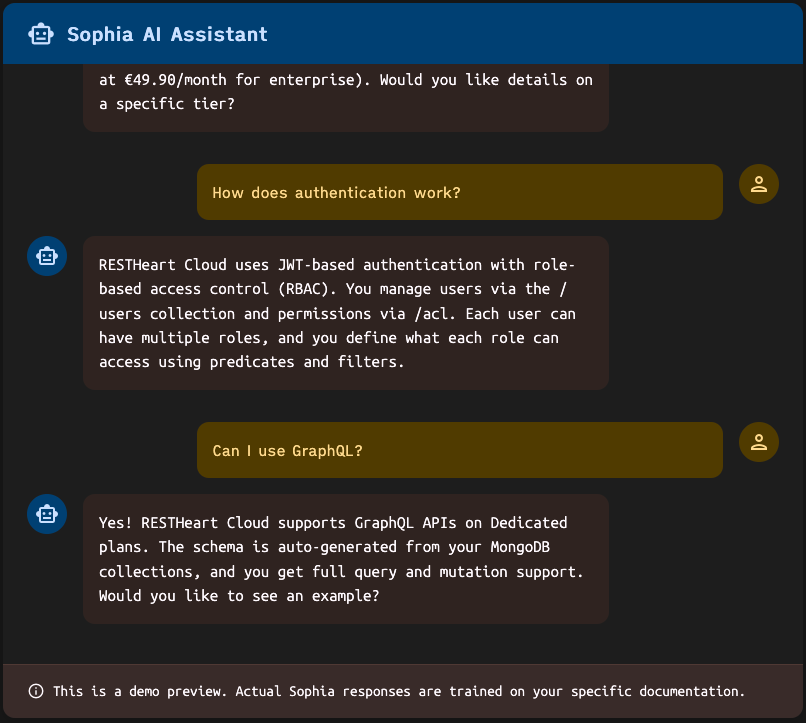
These are examples of questions and answers:
User: "What are the pricing options?"
Sophia: "Ulabase offers four plans: Free (to try it, with 500 MB of storage), Starter (€9 a month, for a small app in production), Pro (€25 a month, for an app that grows) and Enterprise (tailor made, on nodes of your own). Would you like details on a specific plan?"
User: "How does authentication work?"
Sophia: "Ulabase uses JWT-based authentication with role-based access control (RBAC). You manage users via the /users collection and permissions via /acl. Each user can have multiple roles, and you define what each role can access using predicates and filters."
User: "Can I use GraphQL?"
Sophia: "Yes! Ulabase supports GraphQL APIs on all plans. The schema and mappings to your MongoDB data can be defined with a visual editor and you get full query support. Would you like to see an example?"
Each answer carries specific information from the documentation, in conversational form.
Getting Started with Sophia
Sophia is a SoftInstigate product built on Ulabase, sold and billed separately from Ulabase plans. It runs on dedicated infrastructure, with software updates and onboarding included.
The first agent costs €149 a month. Each further agent costs €99 a month, with its own knowledge base and its own access controls. Model inference is billed at the provider's rates, with no markup.
This includes role-based access control, multi-language support, and the security and privacy protections described above. You keep ownership of your data and can delete documents at any time.
Activate Sophia Today
Sophia turns your static documentation into interactive support.
Start from bysophia.ai, or write to sales@ulabase.com. Our team guides you through the setup and helps you upload your first documentation.
For technical documentation and detailed setup instructions, visit Ulabase Sophia Documentation.
Build your app on Ulabase
Your backend is ready in minutes, and you spend your time on your app. The Free plan needs no credit card.